Shown here
- The electronics page gaps and known product facts.
- Electronics buyer details grouped before the page is written.
- Electronics title, summary, sections, FAQ, specs, and search fields ready for team review.
Loading the current XEVRIN page. It will open automatically.
Product page improvement
A stronger electronics page should make compatibility, charging, display output, data ports, and setup limits obvious before the buyer orders.
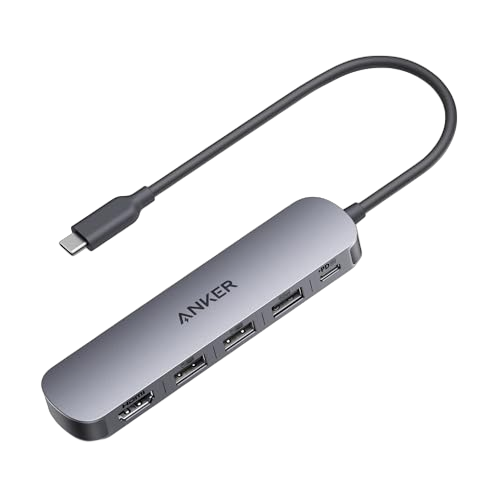
This electronics example shows the starting record, buyer details added, page draft, and checks still needed before live use.
Use these notes to separate the inputs behind USB-C Hub 5-in-1 with 4K HDMI from the checks a live merchant page still needs.
The displayed product photo is a locally cached source image for this demonstration. Anker A8357 manufacturer page. Confirm image rights before production use.
The before view shows the thin product information a shopper would have to decode. The comparison summarizes what changes, and the complete buyer-facing draft follows immediately below.
The weak page lists a hub name and a few ports, but it does not explain which laptops it supports, what 100W charging really means, or what the USB-C ports can and cannot do.
| Item | A8357 |
|---|---|
| Unit | Each |
| Vertical | Electronics |
The full product-page draft shows compatibility, charging, display, and setup limits in buyer-readable language.
The Anker A8357 5-in-1 USB-C Hub adds the everyday ports many modern laptops leave out. Connect an HDMI display, move files through USB-C or USB-A data ports, and keep a compatible laptop powered with USB-C pass-through charging up to 90W when using a 100W USB-C PD charger.
| Item Number | A8357 |
|---|---|
| Unit | Each |
The Anker A8357 5-in-1 USB-C Hub is for shoppers who want one small adapter for a monitor, data devices, and charging. It adds HDMI output, USB-C and USB-A data connections, and USB-C PD-IN charging in a slim hub for desks, travel bags, and hybrid work setups.
Compatibility details are clear before purchase: HDMI output requires a host USB-C port with DisplayPort Alt Mode, pass-through charging depends on a compatible USB-C PD charger, and the USB-C PD-IN port is for charging only.
Yes. The HDMI port supports up to 4K at 30Hz when the connected device supports video output over USB-C DisplayPort Alt Mode.
No. With a 100W USB-C PD wall charger, the hub consumes 10W, leaving up to 90W available for laptop charging.
No. The USB-C PD-IN port is dedicated to charging and does not support data transfer or video output.
It supports compatible USB-C, USB4, and Thunderbolt Macs running macOS 12 or later, plus Windows and ChromeOS devices when the host port supports DisplayPort Alt Mode and Power Delivery.
| Brand | Anker |
|---|---|
| Model Number | A8357 |
| Product Type | 5-in-1 USB-C hub |
| Display Output | HDMI up to 4K at 30Hz |
| Data Transfer | Up to 5Gbps |
| Charging Input | USB-C PD-IN up to 100W |
| Laptop Charging | Up to 90W available with 100W charger |
| Compatible Systems | macOS 12+, Windows, ChromeOS |
| Host Requirement | USB-C port with DisplayPort Alt Mode and Power Delivery |
| Known Incompatibilities | Linux, Nintendo Switch, Apple USB SuperDrive, Google Pixel 9 / 7 Series |
| Dimensions | 4.72 x 1.18 x 0.46 in |
| Weight | 2.03 oz |
These electronics details make the hub page useful because compatibility and port behavior are surfaced before the buyer clicks add to cart.
5 ports and speed details help explain whether the hub fits the buyer's device, display, charging setup, and workflow.
3 display details help explain whether the hub fits the buyer's device, display, charging setup, and workflow.
4 charging details help explain whether the hub fits the buyer's device, display, charging setup, and workflow.
6 compatibility details help explain whether the hub fits the buyer's device, display, charging setup, and workflow.
3 physical specs details help explain whether the hub fits the buyer's device, display, charging setup, and workflow.
The after page replaces shorthand specs with compatibility answers, reducing ambiguity around HDMI output, USB-C charging, and data ports.
| Field group | Current gap | Buyer detail added | Why it matters |
|---|---|---|---|
| Product identity | USB C HUB 5 IN 1 | Model A8357, 5-in-1 hub role, display/data/power use | Specific title and compact product summary |
| Display output | 4K HDMI | 4K at 30Hz and DisplayPort Alt Mode requirement | Clear expectations before purchase |
| Charging | 100W PD | 100W input, 10W hub consumption, up to 90W laptop charging | More accurate pass-through charging explanation |
| Support clarity | No FAQ | Charging-only USB-C PD-IN, OS compatibility, data/video limits | FAQ answers that reduce preventable support questions |
Your store page stays buyer-facing. Marketplace outputs are separate field packages for Amazon and Walmart, prepared for destination rules, validation checks, and merchant-controlled values.
Map ports, charging, display support, compatibility, bullets, images, and merchant-controlled offer values.
Separate product name, key features, electronics attributes, images, and seller-controlled setup fields.